

Riot’s Vanguard anti-cheat has had one complaint stuck to it since day one: it runs whether you’re playing or not. Boot your PC, Vanguard loads. You’re watching YouTube, Vanguard is still sitting in your tray. That’s now officially optional.
On June 24, 2026, Riot rolled out Vanguard On-Demand — a new mode that lets the anti-cheat driver sleep until you actually open a Riot game, then shut back down once you close it. It’s the biggest change to how Vanguard operates since launch, and it directly addresses the privacy complaints the software has attracted for years.
The catch: your PC has to qualify first.
What Vanguard On-Demand Actually Does
Right now Vanguard’s kernel driver loads at Windows startup. That was intentional — starting before anything else gave it a clear view of what was running on your system, making it much harder for cheaters to sneak in a compromised driver before the game launched.
On-Demand changes that. The driver only starts when you open League of Legends, Valorant, or another Riot title. When you close the game, it shuts down. Your taskbar goes back to normal. Vanguard stops being a permanent background process on your machine.
This is opt-in. If you’ve never cared about Vanguard running in the background, nothing changes for you unless you go looking for the setting.
Featured image via Riot Games on X (@riotgames). All rights belong to Riot Games.
What Your PC Needs to Qualify (The Requirements Are Strict)
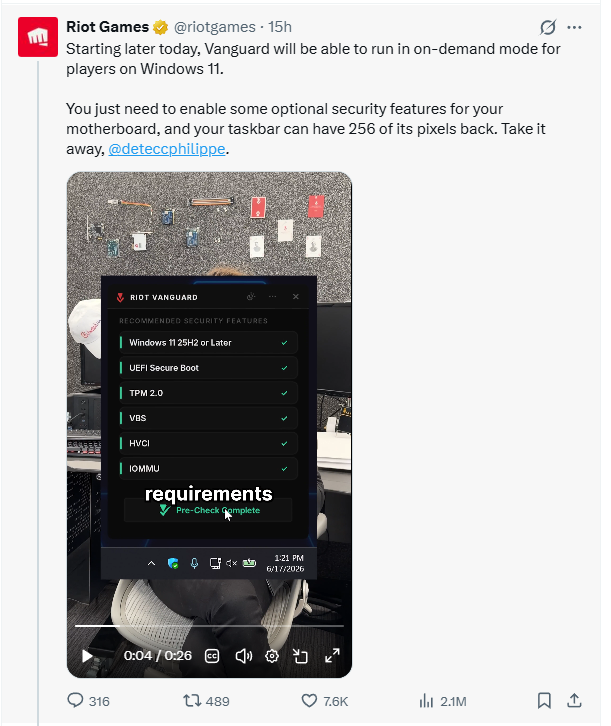
This is where most people will hit a wall. Vanguard On-Demand only works if your system passes Vanguard Pre-Check — Riot’s checklist of modern security features that have to be active before the on-demand option unlocks.
Here’s what you need:
- Windows 11 25H2 or later
- UEFI Secure Boot — enabled
- TPM 2.0 — enabled
- Virtualization-Based Security (VBS) — enabled
- Hypervisor-Protected Code Integrity (HVCI) — enabled
- IOMMU — enabled
If you bought a recent prebuilt or mid-to-high-end laptop in the last couple of years, there’s a decent chance several of these are already on. Riot says roughly 35% of its players already meet Pre-Check requirements without changing anything. For everyone else, these are BIOS/UEFI settings — Vanguard cannot enable them for you.
Riot is rolling out a redesigned tray application called VGTray to walk you through what’s missing. It shows which settings aren’t active, links directly to support docs, and then goes away once everything checks out. They’re also warning people clearly: don’t touch BIOS settings you don’t understand without checking your motherboard manufacturer’s documentation first.
Why This Wasn’t Possible Before
The obvious question is why Riot didn’t just build it this way from the start.
The reason comes down to how kernel-level anti-cheat actually works. Vanguard’s job was partly to watch for vulnerable or malicious drivers that could be used to inject cheats. If it wasn’t running at boot, a cheater could load a bad driver early, map their cheat into memory, and then unload before Vanguard ever saw it.
What changed is a new Windows feature called the Runtime Driver Attestation Report, which Riot says it built in direct collaboration with Microsoft’s Xbox OS Security Team. In plain terms: it gives Vanguard a complete list of every driver that loaded since boot, even if Vanguard wasn’t awake to watch it happen. That log is stored in the TPM chip — which is why TPM 2.0 is a hard requirement. Think of it as a tamper-proof receipt of everything that touched your kernel while Vanguard was off.
This feature only exists in Windows 11 25H2, which is why that’s the minimum version. Riot also points out that cheaters actively avoid enabling these security features — which means the players who qualify for On-Demand mode are exactly the ones less likely to be running cheat software anyway.
Should You Enable It?
Depends on how much the always-on behavior actually bothers you.
If Vanguard in your tray has never been a concern, skip it. There’s no gameplay advantage either way, and Riot made it clear this is purely optional.
If you’ve had privacy concerns about Vanguard running 24/7 — or you just hate background processes you didn’t invite — and your PC already passes Pre-Check, this is a clean win. The security doing the heavy lifting shifts from Vanguard watching everything to Windows itself maintaining an attestation log. You’re not giving cheaters more room; you’re moving the protection to a layer they hate operating in.
Riot estimates only about 3% of weekly players lack the hardware to support these changes at all. So if you’re on a modern system, the door is likely already open.
The option will appear in your Vanguard settings with the next update. Check VGTray first to see if your PC qualifies before digging into BIOS.
FAQ
Q: Does Vanguard On-Demand work on Windows 10?
No. It requires Windows 11 25H2 or later specifically because the Runtime Driver Attestation Report feature that makes it secure only exists in that version.
Q: Will enabling On-Demand mode affect my Valorant or League of Legends gameplay?
No. The anti-cheat protection is equivalent — the mechanism is different, but your game experience and anti-cheat coverage remain the same.
Q: What is VGTray?
VGTray is Riot’s redesigned Vanguard tray application that checks your system against Pre-Check requirements, tells you what’s missing, and guides you through enabling the right settings. It replaces the old tray icon experience.
Q: Do I have to enable Vanguard On-Demand?
No. It is entirely optional. If you leave your settings as-is, Vanguard continues to run at startup exactly as it always has. Nothing changes unless you opt in.
Q: What is Vanguard Pre-Check?
Pre-Check is Riot’s term for the list of security requirements your PC must meet before On-Demand mode unlocks: Windows 11 25H2, Secure Boot, TPM 2.0, VBS, HVCI, and IOMMU all need to be active.